



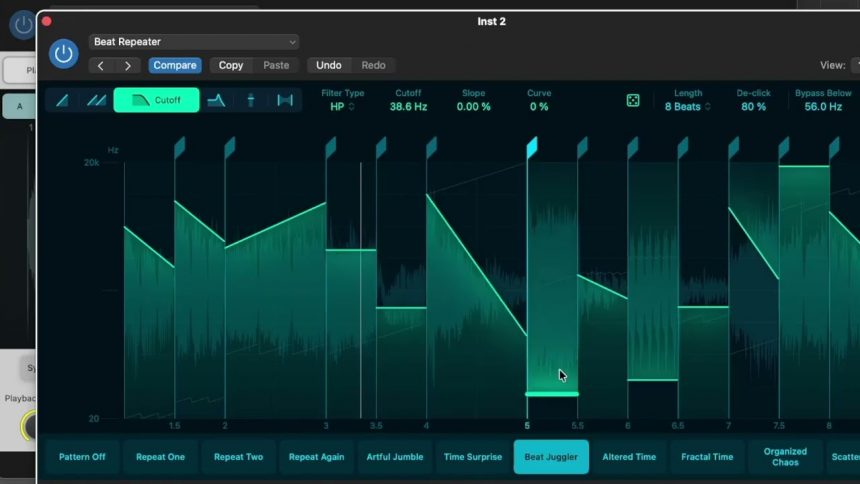
Apple shipped Logic Pro 12.3 on July 1, 2026, and while the release notes list a healthy stack of fixes and quality-of-life tweaks, two stock instruments hog the spotlight: Alchemy (including its touch-friendly sibling, Sample Alchemy) and Beat Breaker. Both are already among the most powerful sound-design tools bundled with any digital audio workstation, and both got meaningfully deeper in this free update. If you make electronic music, sample-based beats, cinematic textures, or anything that leans on granular synthesis and rhythmic slicing, 12.3 is the update that finally makes these plugins sing.
This deep dive explains what Sample Alchemy and Beat Breaker actually are, exactly what changed in 12.3, and how to put the new features to work in a real session.
First, What Are These Two Plugins?
Alchemy is Logic Pro’s flagship synthesizer. It combines multiple synthesis engines — additive, spectral, formant, virtual analog, and granular — inside one instrument, and it can resynthesize any audio sample you drag into it. Sample Alchemy is the streamlined, gesture-driven version of that engine. It takes a single audio sample, analyzes it, and lets you scrub, stretch, and reshape it in real time using an X/Y pad and a small set of macro-style controls. It began life as a Logic Pro for iPad feature and has become a favorite for turning a boring vocal chop or field recording into an evolving, playable instrument.
Beat Breaker is a tempo-synced audio manipulation plugin. Think of it as a drag-and-drop time machine for audio: it slices incoming audio into a grid, and you draw where each slice plays back, how fast, and in what order. It is Logic’s answer to stutter edits, glitch fills, and the kind of rhythmic slicing that used to require chopping audio by hand.
Both plugins share a common philosophy: take a sound you already have and mangle it into something new. That is exactly what 12.3 leans into.
Alchemy’s Headline Change: A New Granular Sync Mode
The marquee addition in 12.3 is a new granular sync mode in Alchemy and Sample Alchemy. To understand why it matters, you need a quick primer on granular synthesis.
Granular synthesis chops a sample into tiny fragments called grains — often just a few milliseconds each — and plays clouds of them back to build new textures. Alchemy already had a capable granular engine, but it worked asynchronously: grains were scattered out in an irregular cloud, which is fantastic for shimmering pads and evolving ambience but not great when you want a clear, stable pitch.
The new sync mode changes that. As CDM described it, the update introduces synchronous granular synthesis, which “lines up those grains so that the resulting timbre can be pitched.” Apple and the coverage on it call this pitched grains: instead of a diffuse haze, the grains lock into a regular rhythm so the ear perceives a definite note. In practice this means Alchemy’s granular engine can now be played melodically, like a real synth, rather than only as a texture generator.
Two supporting features make the sync mode genuinely useful:
- Formant control. You can now shift a sample’s formants — the tonal, vowel-like character of a sound — independently of its pitch. In plain terms, you can make a sample sound higher or lower in character without changing the actual note, or vice versa. Apple frames it as changing “the tonal character of a sample without touching its pitch.” Push the formant control to extremes and, per CDM’s hands-on, “you can get all kinds of ringing, metallic, and edgy textures — plus some beautifully weird stuff.”
- Multiple grain taps. Alchemy lets you add multiple synchronous grain playheads running at once, with controls for spacing between them. Stacking taps layers the texture and thickens the sound, moving from a single pitched tone toward rich, chorused, or dissonant clusters depending on how you space them.
There is one nuance worth knowing: the new grain shape options — including a spiky “Needle” mode that is superb for percussive, particle-like sounds — live in full Alchemy but not in the simplified Sample Alchemy. If you want the deepest control over the grain envelope itself, reach for the full instrument.
Also arriving alongside the engine is grains locking to project tempo, so rhythmically synchronized grain textures stay in time as your song’s tempo changes — a big deal for anyone building generative or arpeggiated patterns that need to sit in the groove.
Beat Breaker Gets Per-Slice Filtering, Panning, and Smarter Randomization
Beat Breaker’s update is arguably even more immediately fun. Previously the plugin was mostly about when and how fast each slice played. In 12.3 it gains control over how each slice sounds and where it sits in the stereo field.
The new modes, applied per slice, are:
- Cutoff mode. A high-pass or low-pass filter you can dial in individually for each slice. Want the first hit dark and muffled and the next one bright and open? You draw it, slice by slice.
- Resonance mode. Adds resonance to those same filters, so you can push slices into whistling, vocal, or acid-like emphasis at the cutoff frequency.
- Pan mode. Positions each slice freely across the stereo image, letting you bounce slices left and right for width and movement without touching an external auto-panner.
The other major addition is expanded randomization. Beat Breaker can now randomize all parameters at once or target individual modes, and it adds two new controls — probability and intensity — so you decide how often variation happens and how extreme it gets. Instead of a blunt “randomize everything” dice roll, you can nudge a pattern toward controlled chaos, keeping the groove recognizable while it constantly evolves. CDM compared the resulting per-slice filter-and-envelope workflow to boutique plugins like Sinevibes Cluster, noting that Beat Breaker’s filter and envelope design gives it its own distinct sonic character.
Practical Workflows for Producers
Here is how these features translate into actual production moves.
Turn any sample into a playable pitched instrument. Drop a vocal, a guitar note, or a field recording into Sample Alchemy, switch to the granular sync mode, and suddenly you can play it chromatically across your keyboard. Automate the formant control across a phrase and the timbre morphs while the melody stays intact — great for evolving leads and haunting vocal-derived pads.
Build metallic percussion and risers. In full Alchemy, combine the sync mode with the Needle grain shape and short spacing between multiple taps. Sweep the formant and you get ringing, metallic transients ideal for sci-fi percussion, tension risers, and glitchy hits. Because the grains follow project tempo, arpeggiated versions stay locked to your grid.
Design generative textures that never repeat. Because the sync mode is pitched and tempo-locked, you can pair it with an arpeggiator and long, slowly automated formant moves to create ambient beds that feel alive rather than static.
Reinvent a boring drum loop with Beat Breaker. Insert Beat Breaker on a break, draw a stutter on beat four, then use Cutoff mode to low-pass the first half of the bar and open it up on the drop. Add a touch of Pan mode so alternating slices ping across the stereo field. Finally, engage randomization with a low probability and moderate intensity so the fill mutates subtly every bar — instant variation without cloning tracks.
Make transitions and fills fast. The per-slice resonance is a shortcut to those zippy, filtered stutter fills that normally take multiple automation lanes. Draw it once inside Beat Breaker and you are done.
Workflow Tips Worth Remembering
- Automate the new parameters, don’t set-and-forget them. The formant control in Alchemy and the filter/pan modes in Beat Breaker come alive when they move. Assign them to Smart Controls or record automation for evolving results.
- Use the Granular Alchemy sound pack as a learning tool. The free pack that ships with 12.3 is built entirely from material processed with the new granular sync mode. Open its presets to reverse-engineer how the taps, spacing, and formant settings were dialed in.
- Watch your polyphony. Multiple grain taps multiply CPU load. On battery or on an older Apple silicon Mac, freeze or bounce heavy Alchemy tracks once you are happy with them.
- Layer, don’t replace. Beat Breaker’s per-slice filtering is destructive-feeling but non-destructive in the session — duplicate your source track so you can blend the mangled version with the clean one for punch.
The Bottom Line
Logic Pro 12.3 is a free, focused update that makes two already-strong instruments substantially more capable. Alchemy’s granular sync mode finally lets its granular engine be played as a pitched, tempo-locked instrument with expressive formant control, and Beat Breaker’s per-slice filters, panning, and smarter randomization turn it from a slicing tool into a full rhythmic sound-design station. For anyone doing electronic, hip-hop, cinematic, or experimental work on a Mac, these are the kind of stock-plugin upgrades that reduce your reliance on third-party software. Install it, open the Granular Alchemy pack, and start mangling.Sources: – Apple — Logic Pro release notes (support.apple.com/en-us/109503) – SYNTH ANATOMY — Logic Pro 12.3 adds new Alchemy granular mode, better Chord ID and more – Gearnews — Logic Pro 12.3: Updates for Alchemy and Beat Breaker, Plus a New Sound Pack – CDM — Logic has new granular, Beat Breaker features; here’s how to use them – MusicRadar — Logic Pro 12.3 is here