


Ask a room full of producers which DAW is best for electronic music and you will start an argument that outlasts the room. In 2026 the two names that dominate that argument are still Apple’s Logic Pro and Ableton Live. Both are excellent. Both have shipped serious updates this year. And both can absolutely produce a finished, radio-and-festival-ready dubstep track. This head-to-head breaks down where each one pulls ahead so you can pick the right tool for your workflow, not someone else’s.
Let’s be clear up front: there is no wrong choice here. This is about fit.
Pricing: One-Time Purchase vs Tiered Editions
The single biggest structural difference is how you pay.
Logic Pro is a one-time purchase of $199.99 on the Mac App Store. That price includes every stock instrument and effect, and every future update — including free point updates like Logic Pro 12.3 — at no extra cost. There is one edition. You get everything. Optionally, Logic Pro for iPad is available through Apple’s Creator Studio subscription (about $12.99/month or $129/year), but the Mac app remains a flat, own-it-forever purchase.
Ableton Live 12 uses a three-tier model, and the tier you choose matters enormously for electronic producers:
- Intro — $99. Limited track counts and a reduced device set. Fine for beginners, but missing the heavyweight synths.
- Standard — $349. Unlimited tracks and most core features, but it does not include Ableton’s flagship synthesis instruments (Operator, Wavetable, Analog) or Max for Live.
- Suite — $749. The full package: every native instrument including Operator, Wavetable, Analog, Meld, and the Granular instrument, plus Max for Live and 70+ GB of content.
For a dubstep or electronic producer, the meaningful comparison is Logic Pro at $199.99 against Ableton Live Suite at $749, because the tools you actually need for aggressive sound design (Wavetable, Operator, Max for Live) live in Suite. On raw value, Logic Pro is dramatically cheaper and hands you the entire toolset for one price.
Platform: Mac-Only vs Cross-Platform
Logic Pro is Mac-only, and Logic Pro 12 requires a Mac with Apple silicon. If you are on Windows, the conversation ends here — Logic is not an option, and that is a genuine, disqualifying limitation for a lot of people.
Ableton Live runs on both Windows and macOS. For anyone on a PC, or anyone who wants the freedom to switch platforms later, Live wins by default. This is the first question you should answer, because it can settle the whole debate before you compare a single feature.
Workflow: Arrangement vs Session View
This is the philosophical heart of the matter.
Logic Pro is built around a traditional linear timeline. You arrange regions left to right along a ruler, much like a tape machine or a film editor. It is intuitive, familiar to anyone who has used a DAW before, and excellent for songs that have a fixed structure — intro, build, drop, breakdown. Logic does have Live Loops, a grid-based, clip-launching view clearly inspired by Ableton, but the linear timeline is where Logic feels most at home.
Ableton Live is famous for its dual-view design. The Arrangement view is a conventional timeline, but the Session view is the reason many electronic producers swear by Live. Session view is a grid of clips you can trigger, loop, and rearrange on the fly — you jam out ideas, launch loops in any order, and capture the performance. For beat-driven, loop-based, improvisational electronic music, this non-linear clip-launching workflow is genuinely faster for generating ideas, and it doubles as a live-performance rig. Live’s warping engine, which time-stretches and locks any audio to the project tempo, is best-in-class and central to how the software works.
If you compose songs start-to-finish, Logic’s timeline feels natural. If you build tracks by jamming loops and phrases, Live’s Session view is a superpower.
Stock Sound Design Tools for Dubstep
Dubstep lives and dies on sound design — the growls, the screeches, the metallic basses, the rhythmic gating. Both DAWs give you serious stock weapons.
Logic Pro’s arsenal:
- Alchemy — a deep multi-engine synth (additive, spectral, formant, granular, virtual analog) that resynthesizes any sample. As of 12.3 it has a new granular sync mode for pitched, tempo-locked grains plus formant shifting — excellent for evolving basses and textures.
- Sampler and Quick Sampler — full-featured sampling for chopping and mangling.
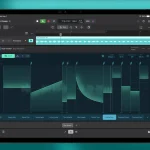
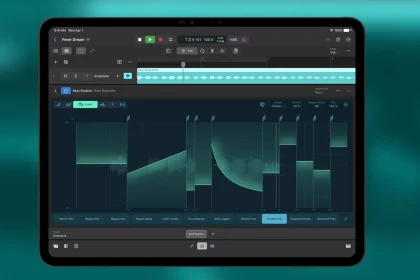
- Beat Breaker — tempo-synced slicing that, after 12.3, adds per-slice filtering, resonance, and panning plus smarter randomization. This is tailor-made for the rhythmic, stuttered, glitchy edits dubstep thrives on.
- ChromaGlow and a large stock effects suite for saturation, distortion, and character.
Ableton Live’s arsenal (Suite):
- Wavetable — a modern wavetable synth that is arguably the single best stock tool for modern bass design. Modulating wavetable positions is how a huge amount of dubstep bass gets made.
- Operator — an FM synthesis instrument superb for metallic, clangorous, and aggressive tones.
- Meld — a bi-timbral, MPE-capable synth added in Live 12 aimed squarely at expressive, evolving sounds.
- Roar — a powerful multi-stage saturation and distortion device that is a genuine secret weapon for grit and aggression.
- Warping — the tempo-locking engine that makes resampling and mangling basses effortless.
- Max for Live — the ceiling-remover. It lets you build or download custom instruments, effects, and generative devices, and it is the reason Live’s ecosystem of community tools is unmatched. Note: Max for Live is Suite-only.
For dubstep specifically, Ableton’s Wavetable-plus-Roar combination, its warping workflow, and the endless well of Max for Live devices give it a slight edge in raw bass-design firepower and community resources. Logic counters with Alchemy’s depth and, after 12.3, a Beat Breaker that is genuinely exciting for rhythmic mangling — and it gives you all of it for $199.99.
CPU and Performance
Logic Pro is exceptionally optimized for Apple silicon. Running on the hardware it was designed for, it handles large projects and demanding plug-in chains with excellent efficiency and low overhead. If you own an Apple silicon Mac, Logic’s performance is a real, tangible advantage.
Ableton Live performs well across both platforms and improved its multi-core handling in the Live 12 cycle. On a comparable Apple silicon Mac, Logic often feels slightly lighter on resources because Apple controls the entire stack, but Live’s cross-platform flexibility means you can spec a powerful Windows machine for less money — a different route to the same goal.
So Which Should You Choose?
- Choose Logic Pro if: you are on a Mac, you want the best value by far ($199.99 for everything, free updates forever), you like a linear timeline, and you want deep stock instruments like Alchemy and a newly supercharged Beat Breaker without paying more.
- Choose Ableton Live if: you are on Windows (or want cross-platform freedom), you produce by jamming loops in Session view, you perform live, or you want Wavetable, Roar, and the vast Max for Live ecosystem for cutting-edge bass design — and you are willing to buy Suite to get the full toolkit.
Both are professional, both make finished records, and plenty of top producers use each. Many even own both. The honest answer is that your platform, your budget, and whether you think in timelines or in loops matter more than any feature spec. Pick the one whose workflow disappears and lets you make music.Sources: – Apple — Logic Pro – Ableton — Live editions and pricing – Audeobox — Ableton Pricing Guide: Intro vs Standard vs Suite (2026) – software4you — Ableton Live 12 Editions: Suite vs Standard vs Intro (2026) – SYNTH ANATOMY — Logic Pro 12.3 update overview