



Every time Apple pushes a Logic Pro point update, the same question ripples through producer forums: should I install it now, or wait? Logic Pro 12.3, released July 1, 2026, is a free update for existing users, which makes the decision easier than most — but “free” is not the same as “install immediately in the middle of a deadline.” This guide walks through everything 12.3 actually adds, who benefits most, and the handful of reasons you might hold off for a week.
What’s Actually in Logic Pro 12.3
The update splits neatly into headline instrument features, a smarter Chord ID, workflow improvements, a new free sound pack, and the usual round of stability fixes.
Improved Chord ID
Chord ID is Logic’s harmonic analysis feature: it listens to audio and works out the chords being played, so other tracks and Logic’s musical assistants can respond in key. In 12.3 it received a substantial rework, and the improvements are practical rather than cosmetic.
According to the update coverage, Chord ID now offers better chord detection across a wider range of musical styles. Specifically, it does a better job with:
- Solo instruments like guitar and piano, where a single instrument carries the harmony.
- Chord inversions and richer chord flavors, including sevenths and major sevenths, rather than collapsing everything to basic triads.
- Imperfect sources — distorted or slightly detuned material that used to confuse the analyzer.
Apple also called out one concrete reliability fix: Chord ID now reliably identifies chords on Intel-based Macs. If you are still running Logic on an Intel machine, this alone may justify the update, because it closes a gap where the feature underperformed on non-Apple-silicon hardware.
“Slice Filters” — What They Really Are
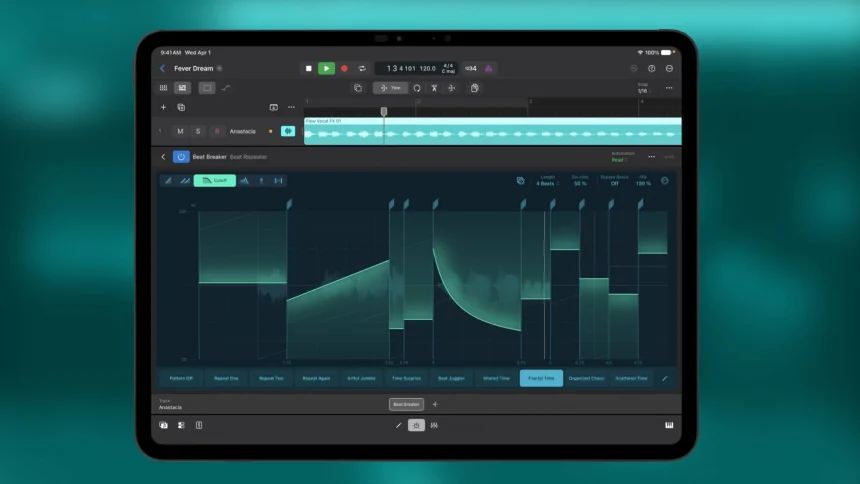
There has been some confusion online about “filters on slices” in 12.3, with a few write-ups suggesting they apply to Quick Sampler or Drum Machine Designer slices. Based on Apple’s release notes and the detailed hands-on coverage, the per-slice filtering in 12.3 lives in Beat Breaker, not in Quick Sampler or Drum Machine Designer.
In Beat Breaker you can now apply a high-pass or low-pass filter to each individual slice (Cutoff mode), add resonance to those filters (Resonance mode), and pan each slice independently across the stereo field (Pan mode). There are also new randomization controls with dedicated probability and intensity settings, so you can introduce controlled variation rather than all-or-nothing chaos. If your workflow involves slicing and rearranging audio — breaks, vocal chops, glitch fills — this is a genuine reason to update.
A New Free Sound Pack
12.3 ships with a new sound pack — reported as Granular Alchemy — containing loops, one-shots, and field recordings, all processed with Alchemy’s new Granular Sync mode. It doubles as both a usable library and a demonstration of the new granular synthesis engine. The update also adds a producer project titled “Shoulda Never,” giving you a full arrangement to pull apart and learn from. These are free downloads through Logic’s Sound Library, so they do not affect the app’s core install.
Alchemy’s Granular Sync Mode
The other big instrument change is Alchemy’s new granular sync mode, sometimes called pitched grains. It locks grains to the project tempo so the granular engine produces stable, playable pitches instead of only diffuse textures, and it adds formant shifting so you can change a sample’s tonal character without altering its pitch. If you do sound design, this is the standout feature; if you mostly track and mix, it is a nice bonus rather than a deciding factor.
Workflow and Tempo Improvements
Two smaller but genuinely useful additions round things out. You can now drag and drop short looping audio files directly into a project and have Flex Time automatically match them to your project tempo, and Smart Tempo has gotten better at analyzing files whose stored tempo information is inaccurate. For anyone working with loop libraries or sample packs, this removes friction from a very common task.
Bug Fixes and Performance
Apple’s release notes list the usual stability work. The update resolves crashes during audio file operations, MIDI editing, and plug-in interactions, and it includes performance improvements for track-management operations. None of these are glamorous, but a DAW that crashes less during MIDI editing is worth having.
Who Should Update Right Away
- Intel Mac users who rely on Chord ID. The reliability fix specifically targets your hardware. This is the clearest “update now” case.
- Beat-makers and sound designers. Per-slice filtering and panning in Beat Breaker, plus the new granular sync mode in Alchemy, meaningfully expand what you can do with stock tools.
- Anyone who works with loops. The drag-and-drop tempo matching and improved Smart Tempo analysis save real time.
- Producers who compose with harmony assistance. The smarter Chord ID — better with guitar, piano, inversions, and seventh chords — improves everything downstream that depends on accurate chord detection.
Who Might Wait (and Why)
Even though the update is free and low-risk, there are legitimate reasons to hold off for a short while:
- You are mid-project on a hard deadline. Never update production software in the final stretch of a paid job. Finish, deliver, then update. This is not specific to 12.3 — it is basic studio hygiene.
- You depend on third-party plug-ins that haven’t been tested against 12.3. Point updates occasionally change how certain AU plug-ins behave. If your session leans on niche third-party instruments or effects, give the plug-in developers a week or two to confirm compatibility, or test the update on a copy of your project first.
- You need to keep collaborators in sync. If you swap Logic sessions with a co-producer, update together so you are on the same version.
- You are on older hardware and space-constrained. The new sound content is optional, but the app update plus libraries still needs room. Not a dealbreaker, just something to check.
Compatibility and System Requirements
Logic Pro 12 requires a Mac with Apple silicon and a current version of macOS; it is a Mac-only application. The one caveat above concerns Intel Macs, which some users still run on slightly older Logic builds — 12.3’s Chord ID fix is aimed squarely at them. The update itself is delivered through the Mac App Store (or the Software Update mechanism tied to your Logic license). Because it is a free update to Logic Pro 12, there is no additional cost: if you bought Logic Pro for its one-time price of $199.99, 12.3 is included at no charge, which remains one of the strongest arguments for the platform overall.
A Simple Recommendation
For the overwhelming majority of Logic users, 12.3 is a clear yes. It is free, it fixes crashes, it repairs Chord ID on Intel hardware, and it genuinely expands Beat Breaker and Alchemy. The only real discipline required is timing: don’t install it in the middle of a deadline, verify your critical third-party plug-ins if your work depends on them, and update in step with any collaborators. Do that, download the free Granular Alchemy pack while you are at it, and you will have a more capable and more stable Logic Pro than you did the day before.
Sources: – Apple — Logic Pro release notes (support.apple.com/en-us/109503) – SYNTH ANATOMY — Logic Pro 12.3: new Alchemy granular mode, better Chord ID and more – We Rave You — Apple releases Logic Pro 12.3 with Beat Breaker updates and new granular sync for Alchemy – Mixdown — Logic Pro 12.3 update: Beat Breaker, Alchemy and bug fixes – Gearnews — Logic Pro 12.3: Updates for Alchemy and Beat Breaker, Plus a New Sound Pack